 Lobstack
Start from the job, set the rules
Lobstack 0.11.18: new agents start from what you want done, every agent gets its own approval rules, and every reply says which model answered and why.
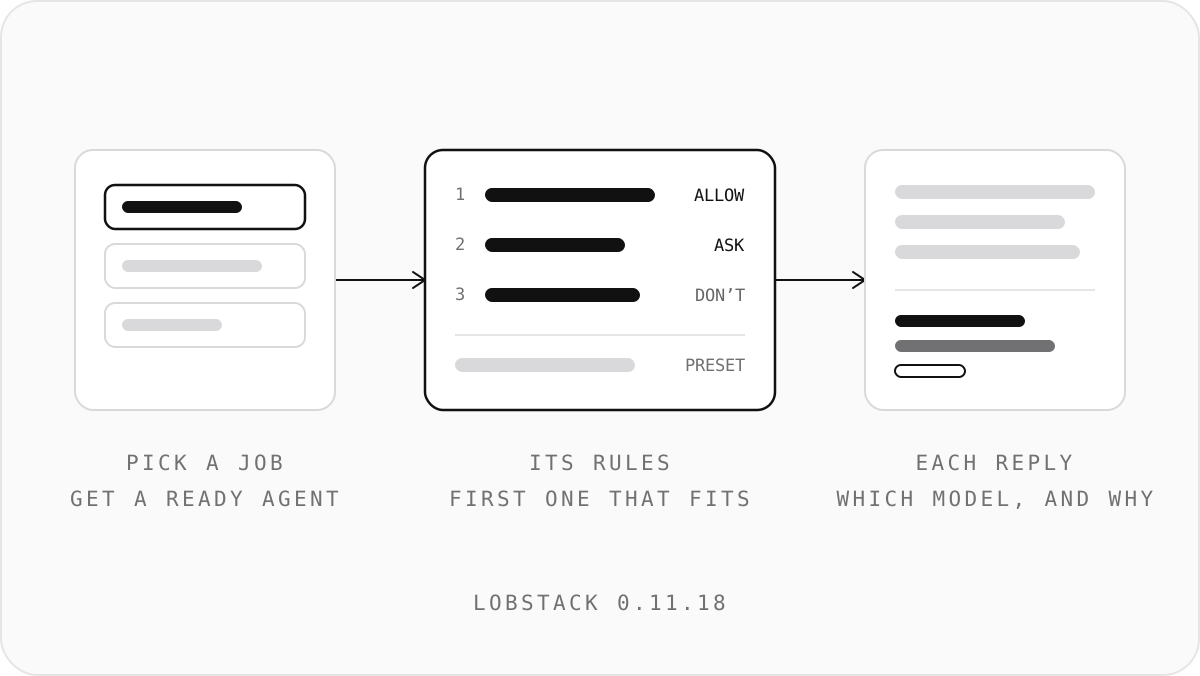
Our first review on G2 was fair. It said Lobstack still felt technical for someone new, and that teams wanted clearer control over permissions, approval rules and which model does the work. 0.11.18 is our answer to all three.
Start from the job
A new workspace used to open on choices about engines, keys and tools before you had asked an agent for anything. Now it opens on one question: what do you want help with?
- Pick one of eight jobs, such as following up after sales calls, sorting the support inbox or reconciling payouts. Or start blank, or browse all 42.
- You meet a ready agent: the skills it already knows, the one connector it works best with (you can skip it), its schedule if the job repeats, and what it will ask you before acting.
- It gets a first task, already written, that works with nothing connected. It waits in the message box until you press Send.
Log In with Lobstack is the main way in. GitHub Copilot and your own provider key are one click away under "Other ways to run your agents". And the words got plainer: "AI engine" is now AI account, and "MCP server" is now Custom tool.
Set the rules
Every agent already had a preset: ask about everything, ask before it changes anything, or never ask. Presets are too blunt for a team, so each agent now has its own approval rules on top.
- Rules read like sentences: "Post message on Slack to #finance — Allow", "Change files outside reports/ — Don't allow". They are checked from the top, and the first one that fits decides. Anything no rule covers falls to the preset.
- Each connector on an agent opens out into its tools, and each tool can be set to Allow, Ask or Off. An Off tool is taken out of the agent's toolset.
- Permissions an agent has earned sit in the same list, each with Revoke.
- Settings › Permissions shows every agent against every connector on one page.
Some things always ask, whatever a rule says: moving money, publishing, using your computer, setup, memory and triggers. A rule can make a payment ask or refuse it. It can never approve it.
See why each model answered
Under every finished reply there is now a line saying which model answered and why, with a link to its receipt. On Lobstack the reason comes from what the router reports, such as how complex the request was or how many tools the agent had.
Each agent also has a model preset: Cheapest that can do it (Nex picks), Best quality, or a specific model. Under Settings › AI Account › Model routing you can set limits for the whole workspace, and each agent can only narrow them:
- which companies and models are allowed,
- the order of fallback models when one is down or busy,
- a price limit per call, with a choice to use a cheaper model that fits or not send at all.
On Lobstack, naming a model sets the most it may use rather than pinning it, so the reply line says when an answer came from a model outside your list.
Agents that arrive ready
Every agent template now comes with its connectors, skills and schedule. There are 8 new agents, including Pipeline, Help Desk and Ledger, and 7 new skills. A Performance view shows what each agent's runs cost, how its requests were answered, and what stopped it, week by week, worked out on your computer.
More connectors
ClickUp and 1Password are new, along with 14 more, from Typefully and beehiiv to PostHog and Datadog. 1Password is read-only by default, and its server cannot hand a secret's value to an agent. Salesforce, Asana and Zendesk are listed as coming, each saying what it waits on.
A connector you tick in the middle of a conversation now reaches the agent's next message.
Search and the browser
Web search tries your own Brave Search or Tavily key first, then Lobstack search when you're logged in, and only then the agent's browser. When a site asks whether you're human, the page is handed to you with Continue, Take Over or Skip; the app never tries to get around the check. The browser view is bigger, and sharp on high-resolution screens.
Worth knowing
- On connectors that publish, every change now asks, and a scheduled run can't publish.
- Scheduled runs read and report; changes wait for you.
- A server you run yourself needs 0.11.18 too.
Your copy updates itself as usual. New here? Get it at /download.